

2026.10.16
Humla: Local-First Meeting Notes for Mac
Humla is an open-source macOS meeting-notes app combining recording, transcription, speaker identification, summaries, cited Q&A, local models, and optional sync.
What it is
Humla is for Mac users who want more control over meeting material than a basic recorder provides. You can take freeform notes while Humla captures microphone and system audio, then produces a transcript, separates speakers, and combines your notes with what was said into a structured summary. The repository is released under the MIT License. The official v0.68.1 release provides a DMG installation path for Apple Silicon Macs.
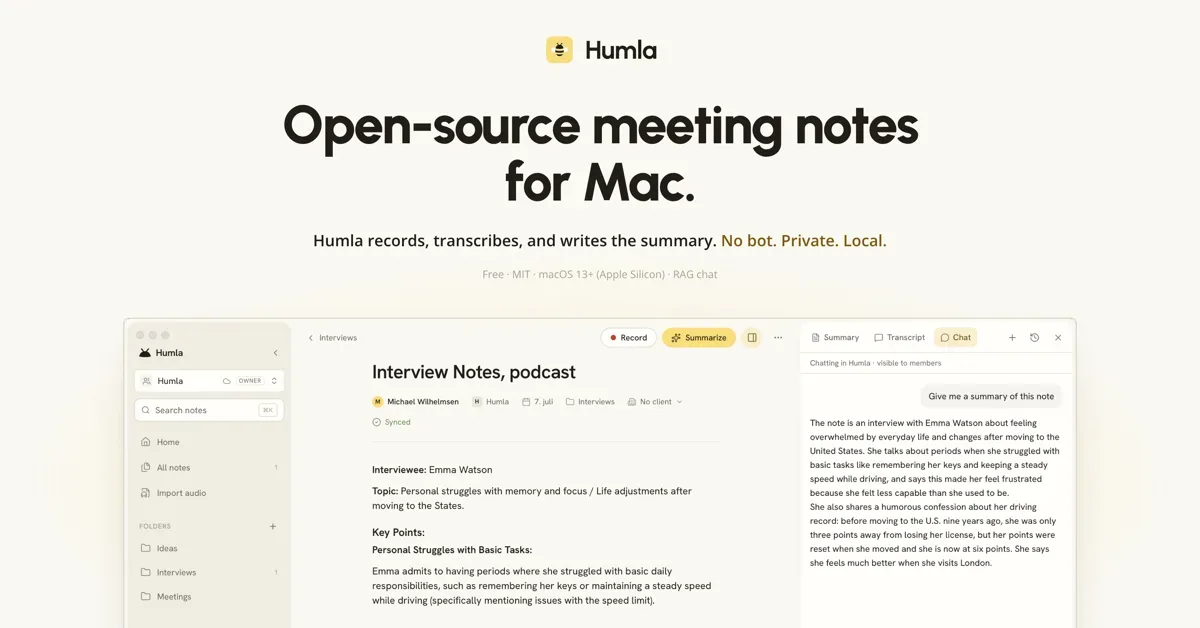
Image source: humla. Published by the project; the interface may vary by version.
Known features
For remote calls, microphone and computer audio are handled as two separate streams, which is intended to keep your voice distinct from other participants in services such as Zoom, Meet, or Slack huddles. For in-person meetings, the app can analyze voices from the room microphone. Transcription options include local Whisper and OpenAI, Deepgram, or Groq. Providers can be overridden by language, and the README explicitly lists a Norwegian-tuned model.
Speaker identification runs on the device. The project lists Nemotron 3 and Community-1 as its two engines, and recognized labels can be renamed in the transcript. Summaries receive typed notes and automatic transcription as separate inputs. They can use OpenAI or an OpenAI-compatible local service such as Ollama, LM Studio, llama.cpp, or vLLM.
Each note also has a chat function. It combines full-text keyword search with semantic retrieval, then cites the notes used for an answer. Humla includes an MCP server for Claude Code, Codex, and other MCP clients to read notes, summaries, and transcripts. The integration is off by default, read-only, and does not expose recordings.
Who it suits
Humla fits macOS users organizing interviews, one-to-ones, lectures, brainstorming sessions, voice memos, or customer meetings. It is particularly relevant to people willing to configure provider keys, download local models, or operate a local LLM endpoint. Users who want to bring meeting knowledge into developer agents may also find the MCP integration useful.
Limits and deployment considerations
The available material targets macOS, and the release specifically mentions Apple Silicon; support for other platforms is not confirmed. “Local-first” also does not mean every workflow is offline. Choosing OpenAI, Deepgram, or Groq for transcription, or a cloud summary provider, sends relevant data to the configured service. A fully local setup requires the appropriate models and a local LLM service, while actual performance, resource use, and recognition quality are not confirmed by the supplied sources.
Audio retention requires a deliberate choice. The README says recordings are normally removed after processing; enabling retention stores playback and raw tracks in the application data directory. Multi-device or team use can rely on Humla Cloud or a self-hosted sync server, but the supplied sources do not confirm self-hosting requirements, server sizing, or operational procedures. Before enabling MCP, organizations should review local database access under their own policies: the tools are read-only and disabled by default, but they can still retrieve meeting content from the active workspace.
Sources
Sources checked: 2026-10-16