

2026.09.18
K7: A Self-Hosted Media Shelf for Small Circles
K7 is a self-hosted media server for family and friends, combining local libraries, multi-device playback, transcoding, permissions, and federation.
What K7 is
K7 is a self-hosted media server designed for a small circle of family and friends. It brings movies, TV series, and music into a locally controlled library rather than requiring a hosted streaming catalog. The project is licensed under AGPL-3.0, making it relevant to households, small communities, and homelab users who want control over media, accounts, and deployment boundaries.
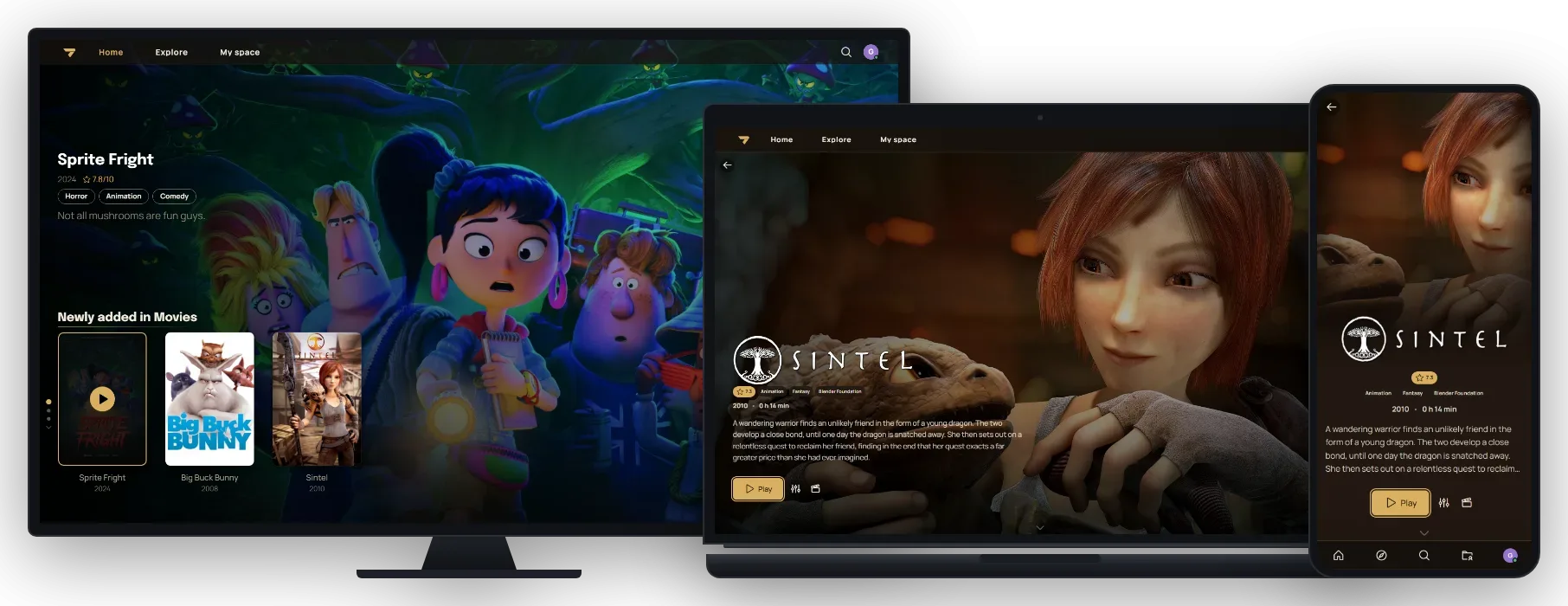
Image source: K7. Published by the project; the interface may vary by version.
Main capabilities
K7 supports movies, TV series, and music. Authentication can be local, with optional two-factor authentication or OIDC, while administrators can enable a limited guest mode. For playback, K7 uses FFmpeg and HLS transcoding when an original file cannot be handled directly by a client or network.
Clients include the web interface, Android phones and TVs, Windows, iOS, and Mac. The project also lists remote control, Chromecast casting on Web and Android, and OpenSubsonic access through an app password. There is an important qualification: the README says iOS and Mac builds exist but have not been tested by the maintainer because Apple hardware is unavailable. Prospective adopters should therefore treat real-world support on those platforms as unconfirmed.
Personal features include playlists, collections, history, statistics, reviews, dynamic playlists, and offline downloads on native clients. Dynamic playlists can reevaluate rules involving genres, years, play counts, artists, and other criteria. Metadata can be edited, and individual fields can be locked so later refreshes do not overwrite local corrections. An optional AudioMuse AI integration adds text-prompt music discovery, but it requires a separately self-hosted AudioMuse server and is disabled until connected.
Sharing between small groups
Federation lets two K7 instances connect so they can share and stream remote media and metadata without duplicating the underlying files. This may suit friends who operate separate servers, but it also adds operational questions around identities, permissions, network reachability, and ownership of shared content. Before enabling it, administrators should define who can see which information and who maintains each instance.
Release v1.12.0 added custom navigation, dynamic collections, a music hit parade, and a separate Docker image for the import tool. The repository describes imports from Plex, Jellyfin, Spotify, and more; the actual migration coverage should still be validated against the project documentation and a representative dataset rather than inferred from the feature label alone.
Limits and deployment considerations
The README provides a Docker quick-start flow using an environment file, a PostgreSQL password, and Compose, followed by first-run setup on local port 7080. The supplied sources do not state minimum CPU, memory, storage, or bandwidth requirements. They also do not quantify the resource cost of transcoding, concurrent playback, downloads, federation, or library scans, so those factors require testing in the intended environment.
Self-hosting leaves responsibility for the database, media paths, backups, updates, network exposure, and account permissions with the administrator. AGPL-3.0 also brings source-sharing obligations when modified software is provided over a network. The project notes that it was built around the maintainer’s specific needs and that contributions are not guaranteed to be merged. K7 should therefore be evaluated as a community project requiring owner-side maintenance, not as a platform with an established commercial support commitment.
Sources
Sources checked: 2026-09-18