

2026.10.03
Nerdlog: A Terminal Log Viewer for Multiple Hosts
Nerdlog uses SSH to query logs on multiple hosts, analyze them remotely, and present merged results in a TUI. It suits lightweight troubleshooting, but SSH, gawk, permissions, and platform limits must be checked first.
What it is for
Nerdlog is a terminal-based, multi-host log viewer designed to query machines directly instead of requiring a central collection service. It opens SSH connections to the selected nodes, analyzes log data remotely, merges the responses, and presents them in a TUI. An interactive timeline histogram helps users see log intensity over time and narrow a query to a useful interval.
Its primary use case is system-log inspection on Linux hosts, including /var/log/messages, /var/log/syslog, and output from journalctl. The README also says that other formats and arbitrary log files are supported, but system logs are the implementation’s main focus. This makes Nerdlog closer to a lightweight troubleshooting and search client than to a full centralized observability platform.
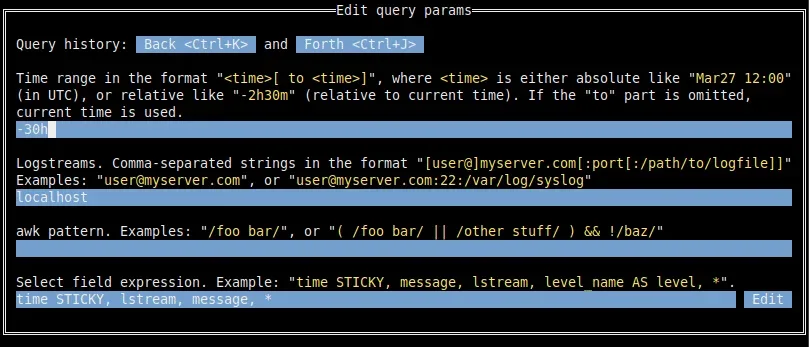
Image source: nerdlog. Published by the project; the interface may vary by version.
Features and intended users
Queries can cover multiple logstreams and filter results by time range and patterns. Nerdlog merges the results into one view, with a log table, query controls, and a timeline histogram. The table can show timestamps, messages, and context tags parsed from log lines; the histogram can be used to select a time range. The application reads SSH configuration and supports host globs. It can also use an arbitrary command to establish a shell session, so access systems such as Teleport are considered in its connection model.
The project is a reasonable fit for developers, operators, and small teams that routinely inspect several Linux machines but do not want to maintain a central log service for every investigation. It may also suit users who prefer terminal workflows and want logs to remain on their original hosts. Repository metadata identifies the project as using the BSD 2-Clause Simplified License.
Querying and data transfer
Nerdlog does not download complete log files to the local machine. According to the README, analysis takes place on the remote nodes; each query returns up to 250 messages per logstream, with that value configurable, plus timeline data. Users can paginate to retrieve more messages. Most transferred data is gzip-compressed.
This design can reduce the amount of data transferred for an initial query, but it does not remove the need to evaluate network connectivity, remote disk reads, SSH session handling, or the cost of querying many hosts at once.
Limitations to check before adoption
Remote hosts generally need SSH access; localhost is an exception. The project also requires GNU awk because it relies on gawk’s -b option, so mawk does not meet the stated requirement. Before deployment, verify the SSH user, port, authentication method, log permissions, and presence of gawk on every target. If elevated privileges are needed to read logs, validate that access path separately in a controlled environment.
On Windows, the README states that the client application can run there, but logs cannot be collected from Windows hosts. Custom formats, rotated-file layouts, and timestamp behavior should be tested with representative samples. The v1.13.0 release records more flexible timestamp parsing, plus fixes involving empty byte ranges on BSD and macOS and mixed time zones; those notes do not establish support for every custom format.
Although no central server is required, the project documentation notes that a separate server for storing log files may still help in some situations. Larger fleets, long retention, audit requirements, or complex permission boundaries therefore need additional planning. “No central server” should not be treated as built-in backup, indexing, or compliance retention.
Deployment decision
Nerdlog is worth considering when the goal is to query system logs quickly from existing SSH-reachable Unix-like hosts. The supplied sources do not establish that it directly provides centralized collection, long-term indexing, multi-team access control, or Windows-host log ingestion. Start with a small set of hosts and verify permissions, gawk, timestamp parsing, rotated files, and network behavior before expanding usage. Use the project’s GitHub releases page for official release artifacts and follow the README for build and installation details.
Sources
Sources checked: 2026-10-03