

2026.10.15
Gotify: Features and Boundaries of a Self-Hosted Messaging Server
Gotify/server offers REST API sending, WebSocket receiving, a web UI, and an extension point for plugins. Review licensing, authentication, storage, and companion clients before adoption.
What it is for
Gotify/server is a self-hosted server for real-time messaging, and its project page says that it includes a web UI. The README separates the core interactions into two paths: senders submit messages through a REST API, while receivers obtain messages through WebSocket. It can therefore act as a messaging entry point and receiving service for scripts, applications, or internal tools.
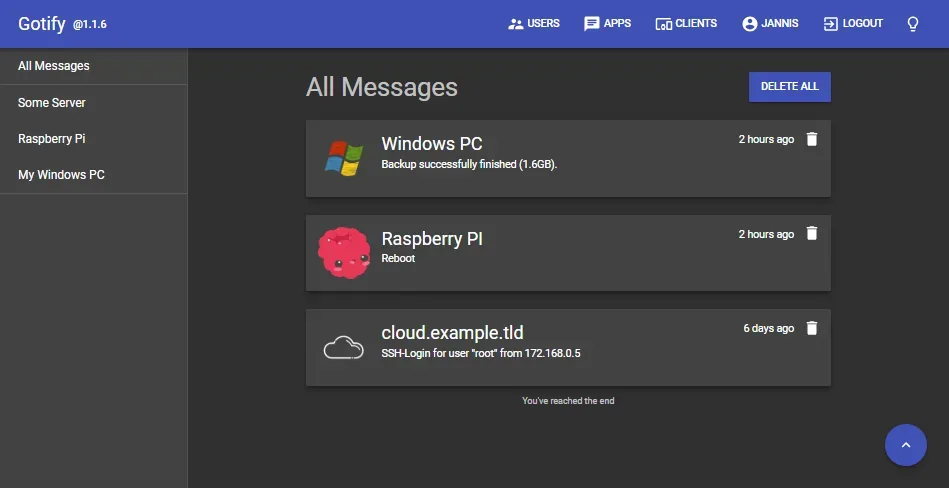
Image source: server. Published by the project; the interface may vary by version.
Who it suits
It is suited to individual server operators, homelab users, and developers adding messaging to internal tools while operating the service themselves. The project provides management for users, clients, and applications, which is relevant to deployments that distinguish among multiple participants. The README also lists gotify/cli for sending messages and an Android app. They are companion projects, however, so their documentation, versioning, and maintenance information should be reviewed separately before use.
Confirmed features and release information
The README confirms REST API message sending, WebSocket message receiving, management of users, clients, and applications, plugins, and a web UI. Plugins indicate that the server has an extension point, but the supplied material does not establish the capabilities, compatibility scope, or maintenance state of any specific plugin. The project says it uses SemVer for versioning.
The official release included in the supplied material is v3.1.1. Its notes state that creating users requires an elevated session, settings pages were adjusted, a crash caused by a failed Let's Encrypt request was fixed, and dependencies were updated. These notes establish those changes in that release, but do not establish security or reliability properties for an entire deployment.
Limits before adoption
The sources do not provide minimum hardware requirements, performance data, capacity limits, or a compatibility matrix. They cannot therefore support an estimate of the messages, connections, or devices that one instance can handle. Authentication details, data storage behavior, network exposure, and client connection behavior should also be checked against the official installation, configuration, and API documentation.
Licensing requires a direct check. The README states that the project is licensed under MIT, while repository metadata gives the license name as Other and the SPDX field as NOASSERTION. Organizations considering adoption should inspect the repository’s LICENSE file and follow their own compliance process.
Deployment considerations
Before deployment, review the official installation, configuration, and REST API documentation, then validate message reception, permission configuration, client reconnection, and upgrades in a test environment. Where plugins, the CLI, or the Android app are used, confirm their relationship to the chosen server version individually. Repository metadata shows that the project is not archived, but the supplied sources do not state a service-level or long-term support commitment. Operating, monitoring, backup, and upgrade decisions remain the deployer’s responsibility.
Sources
Sources checked: 2026-10-15