

2026.10.08
SnapOtter: Bring Multi-Format File Processing Back to Your Network
SnapOtter is a self-hosted stack for image, video, audio, PDF, and document processing, with a UI, REST API, pipelines, and local AI. Evaluate licensing, resources, permissions, and deployment complexity before adopting it.
What it is for
SnapOtter is aimed at individuals, homelab users, development teams, and organizations that want file processing to stay inside their own network. It covers images, video, audio, PDFs, and documents, and exposes the functionality through a web UI, REST API, and reusable pipelines. That makes it suitable for consolidating conversion, compression, OCR, transcription, metadata stripping, and batch processing into one self-hosted service rather than maintaining separate tools for each task.
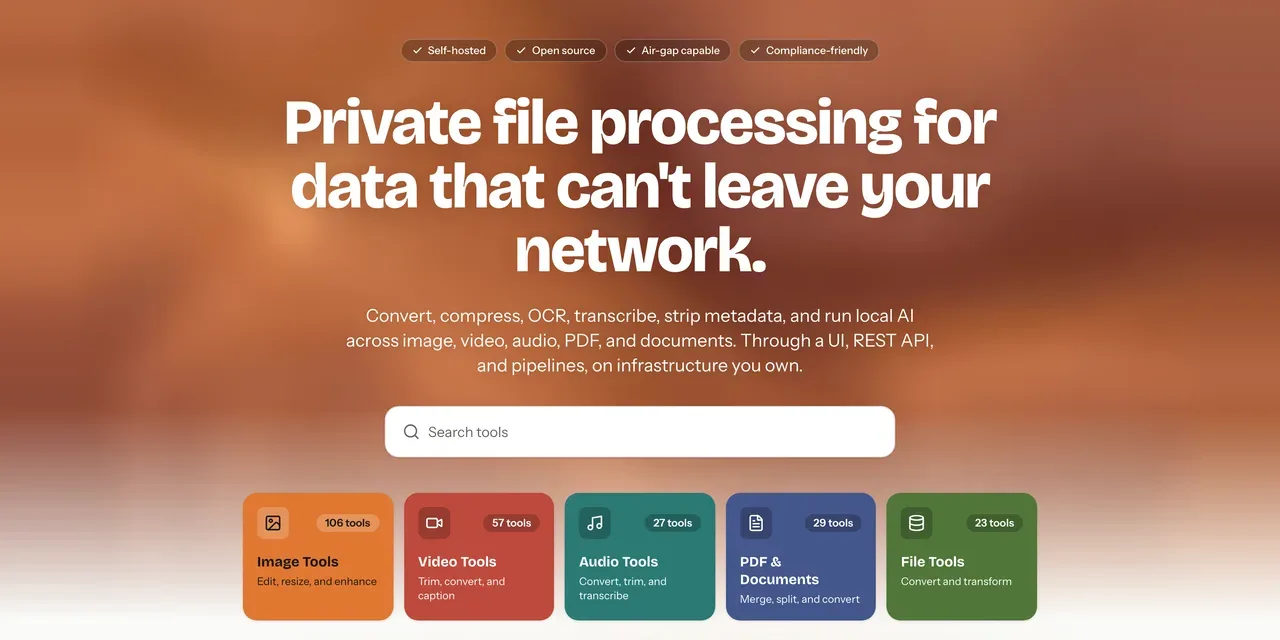
Image source: SnapOtter. Published by the project; the interface may vary by version.
Known capabilities
The README groups the product into five areas. Image tools include resizing, cropping, compression, conversion, watermarking, duplicate detection, and GIF utilities. Video tools cover conversion, compression, trimming, merging, audio extraction, and subtitle operations. Audio tools include conversion, trimming, normalization, noise reduction, and merging or splitting. PDF tools include merge, split, compression, OCR, signing, redaction, and page editing. File tools handle CSV, JSON, XML, YAML, Excel-to-CSV conversion, and ZIP operations.
It also includes a browser-based layer-oriented image editor and local AI features such as background removal, upscaling, photo restoration, object erasing, face enhancement, OCR for images and PDFs, audio transcription, and video subtitle generation. Pipelines can chain tools into reusable workflows. The REST API uses API-key authentication and provides interactive documentation. The interface lists 21 languages, including Simplified and Traditional Chinese.
Version 2.2.0 added rounded cropping, frame-by-frame background removal for animated images, an object-eraser lasso, and a high-quality mode. It also lets users save edits as a new file or overwrite the original. The release fixed several security and authorization issues, including privilege escalation through a delegated users:manage role, missing permission checks on tool endpoints, and a rate-limit bypass on Docker installations. Anyone operating a multi-user instance should verify that the fixed release is deployed and review custom roles.
Deployment considerations and limits
The project supports AMD64 and ARM64. A single-container option is presented for quick starts, while the README describes a production Compose setup using the application, Postgres 17, and Redis 8. Long-term operation therefore involves more than starting the application: operators should plan persistent storage, database and queue maintenance, backups, upgrades, and network exposure. The default credentials must be changed at first login, and public access should be evaluated alongside the operator’s reverse proxy, identity, and access-control design.
NVIDIA users can use the CUDA configuration for acceleration of selected AI tasks. Intel and AMD integrated-GPU AI inference is not currently supported and runs on the CPU. The supplied sources do not state a universal minimum hardware requirement or performance guarantee, so throughput should be validated against file types, concurrency, models, and hardware. The project’s statement that files stay within the network does not remove the need to inspect logs, backups, proxies, and administrator access paths.
Licensing also needs early review. The repository identifies AGPL-3.0, while the README describes a commercial license and an open-core boundary. Teams planning to embed SnapOtter in proprietary software or SaaS should review the repository licensing files and confirm the applicable terms before deployment. Overall, it fits users who need a unified media-processing endpoint, are prepared to operate containerized infrastructure, and can handle AGPL compliance. For a one-off conversion, self-hosting may be more operational work than necessary.
Sources
Sources checked: 2026-10-08