

2026.09.24
Token Monitor: A Local Desktop View for AI Coding Usage
Token Monitor targets developers who use several AI coding tools and want one place for usage, cost, limits, and history. Its integrations differ in data source, freshness, and credential requirements, so deployment needs tool-by-tool review.
What it is for
Token Monitor is a local-first desktop widget designed to consolidate token usage, costs, and account limits from AI coding tools. The README describes support for more than 38 tools, including Claude Code, Codex, Cursor, OpenCode, OpenClaw, GitHub Copilot, and Cherry Studio, with synchronization across devices.
It is best suited to individual developers who use multiple coding assistants and need to watch subscription limits or longer-term usage trends. Teams may find the device and tool views useful, but the supplied sources do not document team permissions, auditing, or centralized administration. It should therefore not be treated as an organization-wide usage platform without further verification.
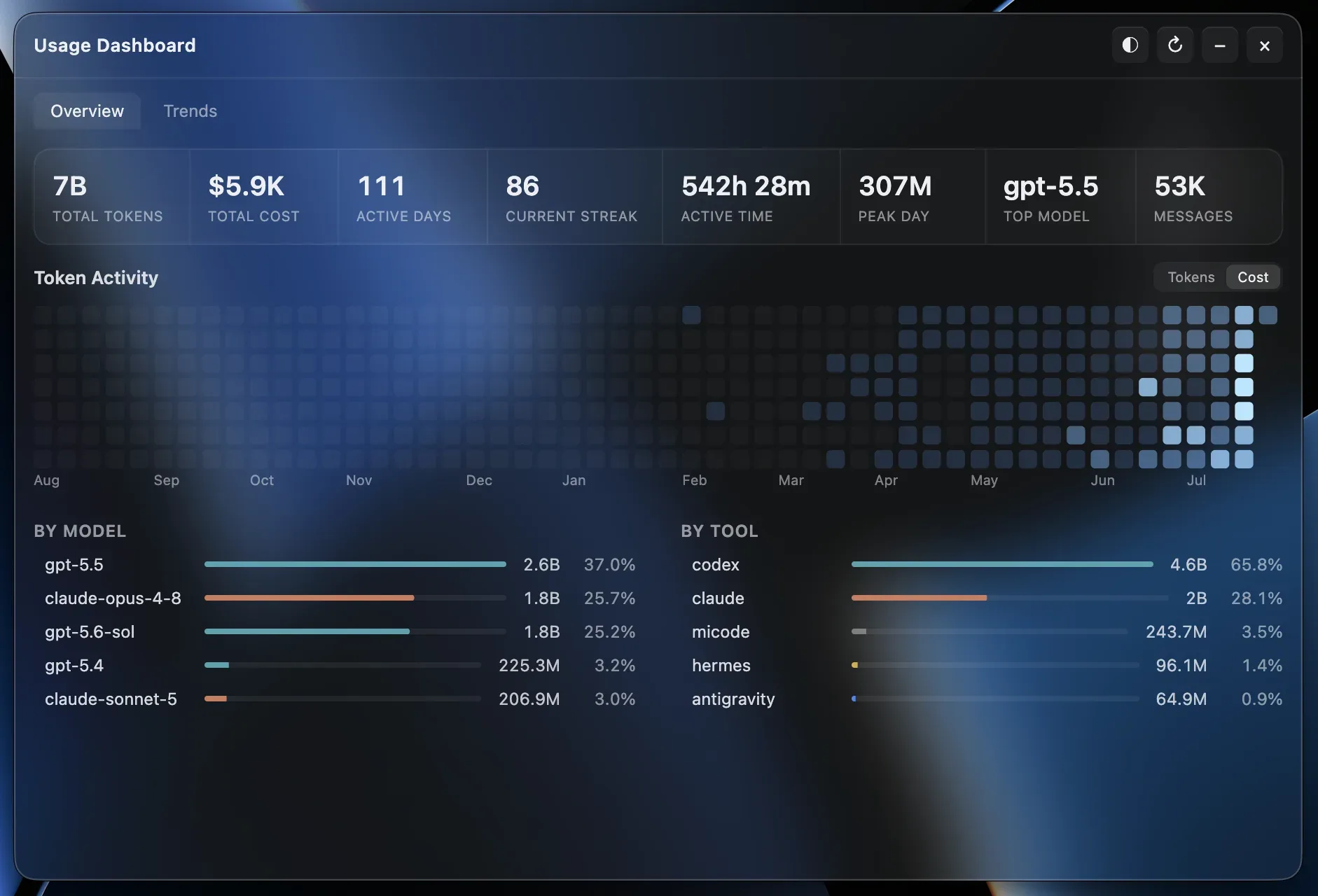
Image source: token-monitor. Published by the project; the interface may vary by version.
Documented features
The interface can break data down by tool, device, model, session, and project. The README describes token and cost views, cache-hit details, session-level prompts and replies, tool usage, yearly activity heatmaps, daily trends, and optional token-rate displays. Costs can be shown in USD, TWD, HKD, or CNY, with exchange rates updated automatically or overridden manually. Accuracy still depends on the underlying provider data and price mappings.
Integration coverage is uneven. Claude Code, Codex, and OpenCode list usage, limits, and session details, while Hermes Agent, OpenClaw, and Qwen CLI primarily provide usage data. OpenRouter, Minimax, Volcengine, Ollama Cloud, and other account integrations mainly provide limits or account status. Release v0.61.0 added Devin CLI and Desktop usage and limits, ClinePass limits, MiMo Desktop usage, Copilot CLI usage, and Claude Code context display.
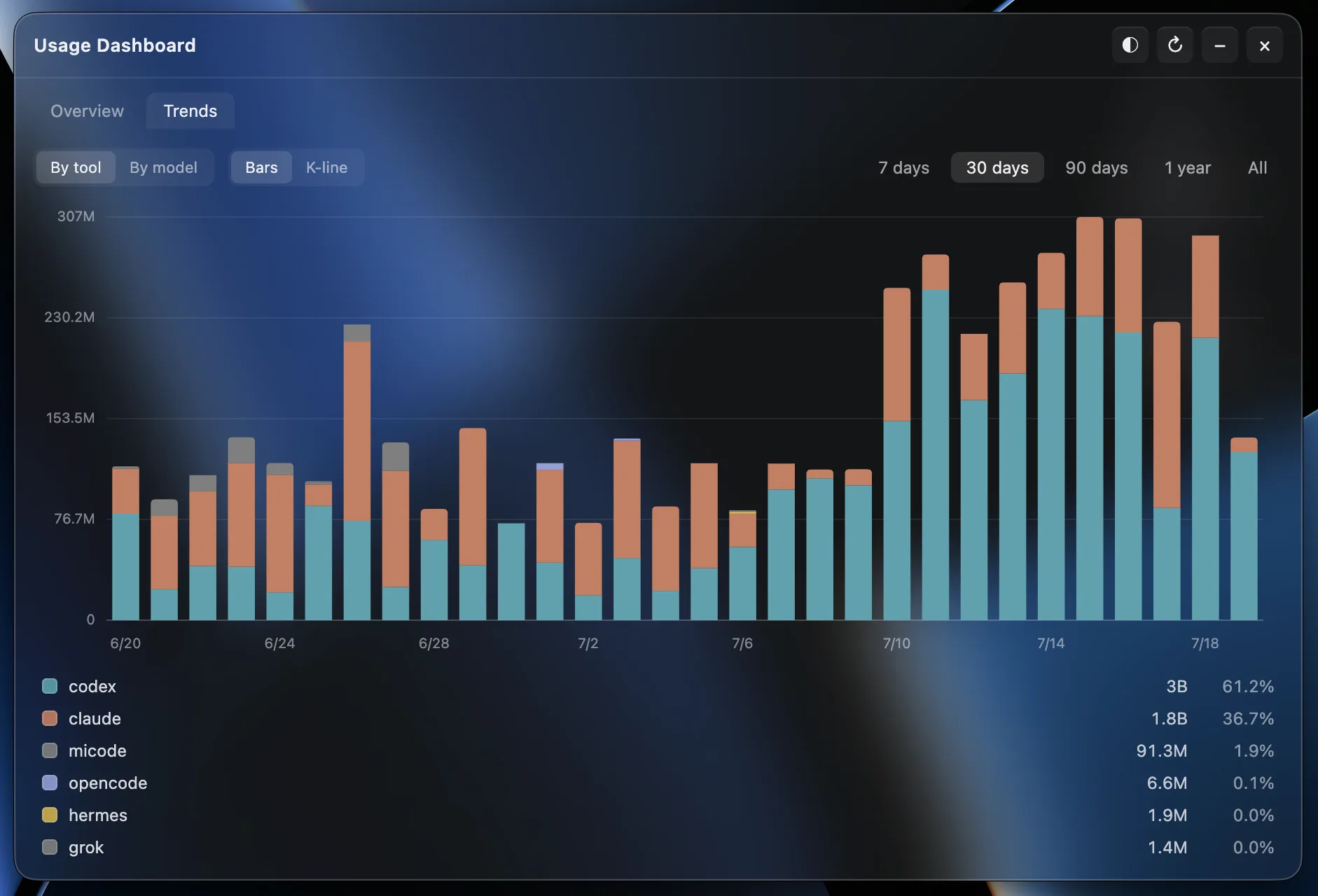
Image source: token-monitor. Published by the project; the interface may vary by version.
Limitations before adoption
The application reads local logs, transcripts, JSONL files, SQLite databases, or application caches created by other tools. Paths can be overridden through environment variables, but actual coverage depends on tool versions, login methods, execution locations, and whether the expected local files exist. On Windows, WSL file-based usage can be merged; the README notes that some SQLite-backed tools may require a headless agent inside WSL.
Credential requirements also deserve careful review. Some limit integrations require API keys, cookies, access tokens, or cloud-provider credentials. Before deployment, users should check credential handling, permission scope, and organizational policy. The supplied sources do not provide a complete security audit or unified secret-management design, so no security conclusion should be inferred.
Freshness and precision vary. Cursor uses an account-level usage export, and newly completed sessions may take minutes to appear. Command Code lacks actual token counts and per-message model metadata, so usage is estimated from transcript text and cost or model attribution may be derived. The Qoder CN adapter may break if its local database schema changes. The README also excludes LM Studio’s built-in Chat UI and native /api/v1/chat requests from current tracking, while Unsloth Studio tracking excludes training tokens.
Deployment considerations
The repository metadata identifies the project as MIT-licensed. Release v0.61.0 provides builds for Apple Silicon and Intel macOS, Windows installer and portable versions, and a Linux x64 AppImage. Other platforms do not have pre-built packages in the release notes and require running from source according to the README.
Before adopting it, list the tools that matter, verify their documented data paths and supported dimensions, and decide whether account-limit integrations are appropriate. Users with strict privacy requirements should separately assess local log access and credential boundaries. For someone using only one provider, the project’s multi-tool aggregation may offer limited additional value.
Sources
Sources checked: 2026-09-24